Power Monitoring
KPM31 single-phase DIN Rail Prepaid Energy Meter integrates data acquisition and control functions
Learn More
If you recently replaced your old electricity meter with a modern digital one, you might be wondering how to understand the new screen.How to Read Your Digital Energy Meter? Reading a digital meter is generally much simpler, but the flashing numbers and different display patterns can be confusing.
In this article, we'll walk you through the reading process for the most common types of digital power meters, so you'll be able to confidently read your meter, track your energy consumption, and ensure your bills are accurate.
Check your bills: Verify that your energy provider's charges match your actual usage.
Track your usage: Monitor your daily or weekly electricity consumption to identify waste.
Actual budgeting: See your electricity consumption in real time without waiting for an estimated bill.
Submit accurate readings: Avoid relying on estimated bills, which may be too high or too low.
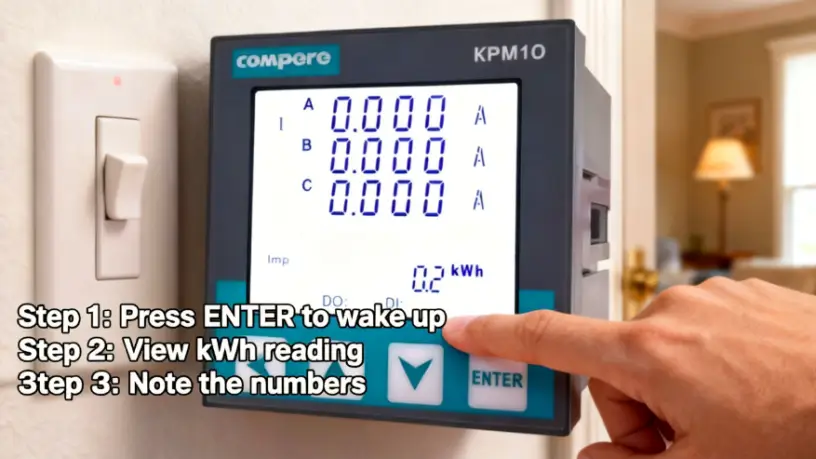
You'll likely encounter two main types of digital energy meters. Their reading processes differ slightly.
Standard Digital Meter: This type of meter features a simple digital screen that cycles through different information.
Smart Meter: Smart meters automatically send readings to your supplier and also have a digital screen that you can read manually. They typically display multiple rates (e.g., day and night).
This is the most common type. The key is to be patient and observe the cycle of the display.
Locate your meter: It's usually located in your garage, basement, hallway closet, or on the side of the house.
View the screen: You'll see a series of numbers flashing on the LCD screen. It may cycle through different information such as time, date, and various meter readings.
Wait for the "Rate" or "Import" reading: The most important number is your cumulative kilowatt-hours (kWh) usage.
Write down the number: Write the number completely from left to right, including leading zeros. If there is a decimal point, ignore the digits after the decimal point.
For example: If the screen displays 001546.2 kWh, your meter reading is 1546.
What does the flashing indicator light mean?
Many digital energy meters have a flashing red LED indicator. Each flash usually represents a certain amount of electricity used (e.g., 1 watt-hour). It's a visual indicator of your real-time electricity consumption—the faster it flashes, the more electricity you've used.
While smart energy meters send readings automatically, you can still read them manually. The process is very similar to a standard digital meter.
Press the button: Most smart meters have a button to wake up the display or switch menus. You may need to press it a few times.
Find your main consumption (kWh): Locate the screen that displays your total electricity consumption (kWh). It's usually the first screen displayed.
Pro tip: The indoor display of a smart meter is the best tool for monitoring your electricity consumption. It displays your real-time electricity consumption in pounds and pence, making it easy to understand your usage. Conclusion: You're an expert now!
Reading an electricity meter is a simple yet practical skill. By spending just a few minutes familiarizing yourself with the display, you can take control of your electricity bill, improve your energy-saving awareness, and ensure you only pay for the electricity you actually use.

Power Monitoring
KPM31 single-phase DIN Rail Prepaid Energy Meter integrates data acquisition and control functions
Learn More
Power Monitoring
The KPM33 Three-phase DIN-rail 4G Prepaid Energy Meter is designed for DIN-rail mounting.
Learn More
Power Monitoring
The KPM37 4G Three-phase OEM Energy Meter features a 35mm DIN rail mounting design and an LCD display.
Learn MoreCompere provides the integrated energy management solution including online monitoring, analyzing, reporting, controlling, maintenance, production management, prediction, and other functions. We offer u technical support and professional solution at 7*24h service.
Unit 1, Building 38, LIANDONG U Valley, No. 352 Lianhua Street, High-tech Zone, Zhengzhou, China
Our helpline is always open to receive any inquiry or feedback.Please feel free to drop us an email from the form below and we will get back to you as soon as we can.
Compere mainly provides kpm series smart energy meters. If you have any needs, please feel free to contact us.